How to Use Semantic Search
Semantic search understands the meaning behind your words, not just exact keywords. Instead of knowing a product's exact name, you can describe what you are looking for in plain language and the AI will find relevant matches.
Steps
-
Click Products in the left sidebar to open the Product Catalog.
-
Click the sparkle icon next to the search bar to activate semantic (AI-powered) search mode.
-
Type a natural language description of what you are looking for. For example:
- "eco-friendly cups" -- finds compostable containers, plant-based drinkware, and sustainable cup options even if "eco-friendly" is not in the product name.
- "something to replace plastic straws" -- surfaces biodegradable and compostable straw alternatives.
- "cleaning supplies for kitchen" -- returns kitchen-appropriate cleaning products.
-
Press Enter. The AI returns results ranked by relevance to your description.
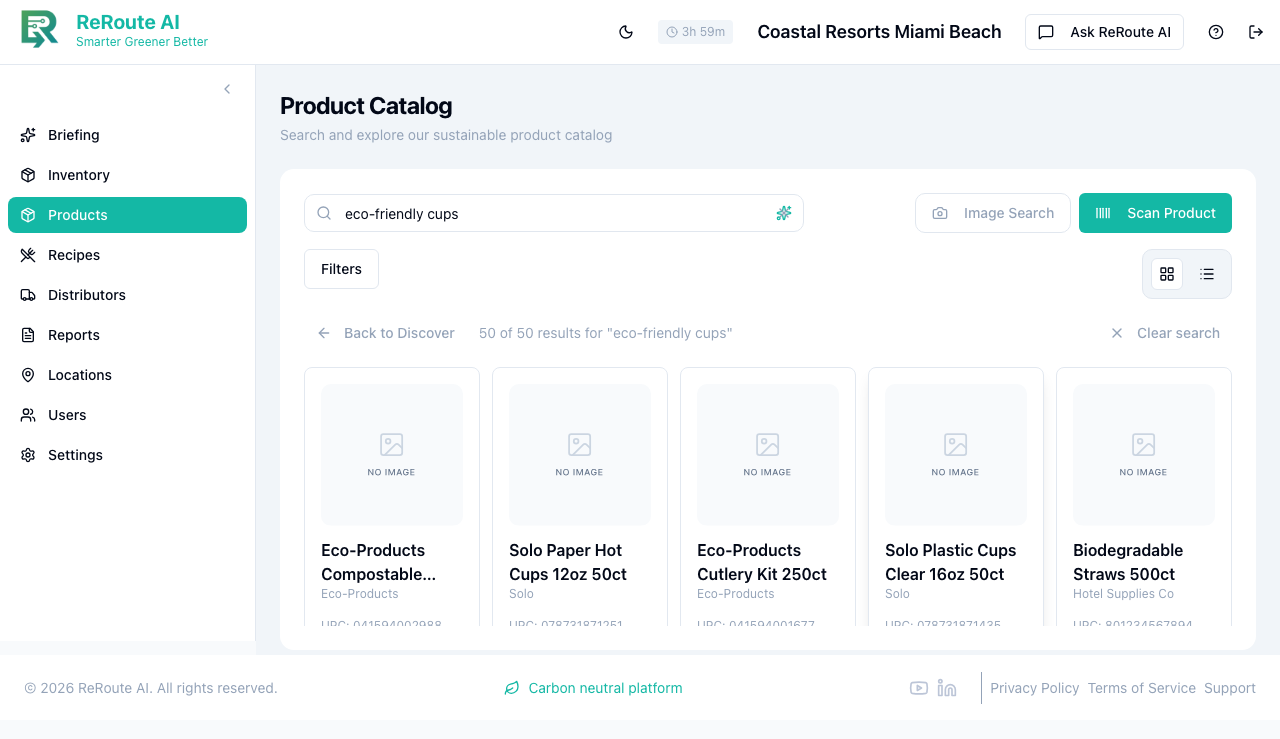
-
Use the Filters button to narrow results further by category, score range, or other attributes.
-
Click on any product card to view its full detail page with sustainability scoring and eco-alternatives.
How it differs from regular search
| Regular text search | Semantic search |
|---|---|
| Matches exact keywords and close misspellings | Understands intent and meaning |
| "eco" finds products with "eco" in the name | "eco-friendly cups" finds all environmentally friendly cup-like products |
| Best when you know the product name | Best when you know what you need but not the specific product |
Semantic search is a great way to discover eco-alternatives. Try searching for descriptions like "sustainable alternative to foam containers" to find greener options already in your catalog.