How to Use Demand Forecasting
The Restock tab uses AI to predict how much of each product you will need over the coming days and weeks. Use these predictions to order the right quantities and avoid both stockouts and overstock.
Steps
-
Click Inventory in the left sidebar.
-
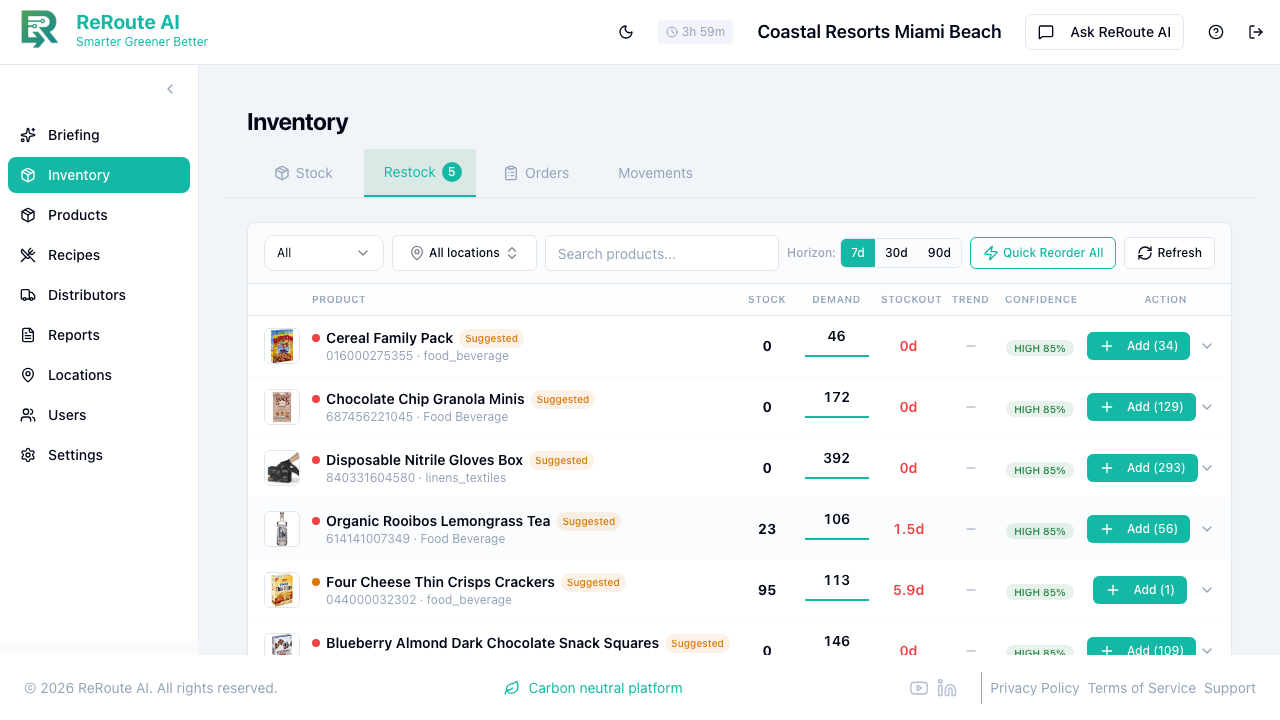
Click the Restock tab at the top of the page. (This tab combines demand forecasting with reorder suggestions — the number on the tab shows how many items need reordering within 7 days.)
-
Select a forecast horizon using the pill buttons:
- 7d -- next 7 days (most accurate, best for weekly ordering).
- 30d -- next 30 days (useful for monthly planning).
- 90d -- next 90 days (for seasonal planning and budgeting).
Use the All locations filter to the left of the horizon buttons to focus on a single location or view all of them together.
-
Review the forecast table. Each row shows:
- Product -- name and UPC.
- Stock -- what you have now.
- Demand -- predicted usage over the selected horizon.
- Stockout -- how soon you may run out at current levels (e.g. "1.5d", or "0d" if already out).
- Trend -- whether demand is rising, flat, or falling.
- Confidence -- how certain the model is (HIGH, MEDIUM, or LOW).
- Action -- an Add button with the suggested reorder quantity. Use Quick Reorder All to add every suggestion at once.
-
Click the expand arrow (chevron) at the end of any row to see a visual forecast with:
- A prediction line showing expected demand.
- A shaded confidence band (80% of actual demand should fall within this range).
- Historical usage dots for context.
Reading confidence levels
- Narrow confidence band -- demand is predictable. Order to the forecast.
- Wide confidence band -- demand is variable. Order to the upper bound or keep extra safety stock.
- Band widening over time -- uncertainty grows. Trust the 7-day forecast more than the 30-day.
You can also ask the AI on the Briefing page: "What's the forecast for this weekend?" or "What should I order this week?" for a conversational forecast summary with specific ordering recommendations.